Licensing
Corelight Investigator offers an Advanced license and also an evaluation version. The type of license determines the features and functionality.
This table summarizes the features supported by each license type.
Feature |
Advanced Eval |
Advanced |
|---|---|---|
Incident Response |
||
Detection triage and workflow |
✅ |
✅ |
Alert aggregation, prioritization, and tuning |
✅ |
✅ |
Analytics |
||
Corelight sensor collections |
✅ |
✅ |
Suricata IDS + Proofpoint ET Pro ruleset |
✅ |
✅ |
Cloud-based ML detections |
✅ |
✅ |
CrowdStrike Falcon X IOC database |
✅ |
✅ |
Data Retention |
||
Investigator alerts & detections |
90 days |
90 days |
Full Zeek + Suricata logs |
30 days |
30 days |
Additional Zeek + Suricata log retention |
Optional |
Optional |
Data Export to SIEM/XDR |
||
Full Zeek + Suricata log export from sensor |
✅ |
✅ |
Alert export from Investigator |
✅ |
✅ |
Administration & Integration |
||
SAML / SSO |
✅ |
✅ |
Security auditing |
✅ |
✅ |
Fleet Manager |
✅ |
✅ |
Smart PCAP |
✅ |
✅ |
Support & Services |
||
Standard support |
✅ |
✅ |
Enterprise support |
➖ |
Optional |
QuickStart service |
✅ |
✅ |
Managed threat hunting services |
➖ |
Optional |
License status
You can view your license status and details at any time. From the System Settings in the left navigation, choose General Settings.
The License Status section displays your license information, including the start date, the expiration date, and the primary contact for your account. The section also shows the type of license you have and the log retention period.
The license information is read only; contact Corelight Support or your Account Manager to make any changes.
Provisioning requirements and limitations
Before provisioning a new environment or adding tenants to an existing structure, ensure the deployment meets the following capacity, licensing, and regional requirements.
Tenant sizing limitations
These limits apply to all deployments, including individual Child Tenants within a Federated (Parent) structure:
Minimum Capacity: Investigator does not support tenants below 1Gbps.
Maximum Capacity: Provisioning any tenant type exceeding 500Gbps requires three months’ advance notice and approval from Corelight. This limit applies to both standalone deployments and Child Tenants in a Federated (Parent) structure.
Federated tenant limitations
Federated (Parent) and Child Tenant deployments are subject to the following regional and licensing constraints:
Licensing Restrictions: If the Federated (Parent) is a customer, a Child Tenant cannot be added as a POV (Proof of Value) customer.
Regional Requirements: Federated (Parent) tenants are not supported across multiple regions. All Federated (Parent) and Child Tenants must reside within the same service region.
New datacenter regions
Corelight Investigator datacenters are available in the following regions:
North America: us-west-2
Europe: eu-central-1
Middle East: me-central-1
Requests for new regions can be made by contacting your Corelight representative. New region expansion is a feature request and requires advance notice and Corelight approval.
License expiration
Customers with receive warnings starting at 60 days before a license expires. The Investigator interface displays a warning in the left navigation panel and indicates the number of days before license expiration.
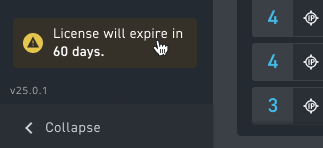
The system also sends an email notification to account admins at 60 and 30 days before expiration and when the license expires.
Once a license expires, account users cannot log in to Investigator. Corelight keeps the account infrastructure for a 90-day grace period and after that, deletes all infrastructure.
Contact Corelight Support or your Account Manager to renew your license.
With an Advanced license, Investigator imports all log data. Imported logs are available in the log search page.