Agentic Triage
Agentic Triage is a Corelight AI-driven analysis engine that automates the initial investigation of network security alerts. The system continuously processes network data and security events using expert-authored playbooks to validate potential threats.
Unlike tools that only provide basic data summaries, Agentic Triage offers transparent, evidence-based findings by performing alert correlation and evidence gathering before a manual investigation begins. While the system provides automated analysis and recommended actions, the human analyst remains the final authority for all triage and response decisions.
Important
Content accompanied by the AI icon is generated by Corelight AI using a large language model. Because an AI algorithm generates this content, there might be errors or omissions; always use your best judgment to verify findings during your investigations.
Key benefits
By automating complex investigative workflows, Agentic Triage delivers high-fidelity results that enhance the efficiency and effectiveness of the modern SOC. The system prioritizes investigations by grouping related alerts into a single entity-based view, allowing analysts to address the highest-risk assets first.
Automated prioritization: Start your day triaged. Analysts begin each investigation with a pre-analyzed list of the top priority entities identified in the preceding 24-hour analysis cycle, rather than a raw queue of alerts.
Workflow efficiency: Reduce alert fatigue. The system filters out noise by automating hours of manual log correlation and data gathering, completing complex investigative tasks in minutes.
Standardized methodology: Every investigation follows rigorous playbooks to ensure consistent, thorough results regardless of an analyst’s experience level.
Telemetry-driven analysis: The system executes targeted queries across network telemetry and host context to transform raw events into a clear, corroborative threat narrative.
Evidence-based authority: Agentic Triage substantiates every conclusion by connecting different alerts and historical data. Every finding is backed by actual JSON evidence and log queries, ensuring all conclusions are independently verifiable by the analyst.
How Agentic Triage works
Agentic Triage is an automated analysis pipeline powered by Corelight AI. The system uses a multi-agent architecture to investigate detection events and produce a synthesized, evidence-backed narrative. An orchestration layer manages these agents by executing playbooks that correlate network telemetry and host context to verify findings.
The Agentic Triage process follows a specific flow:
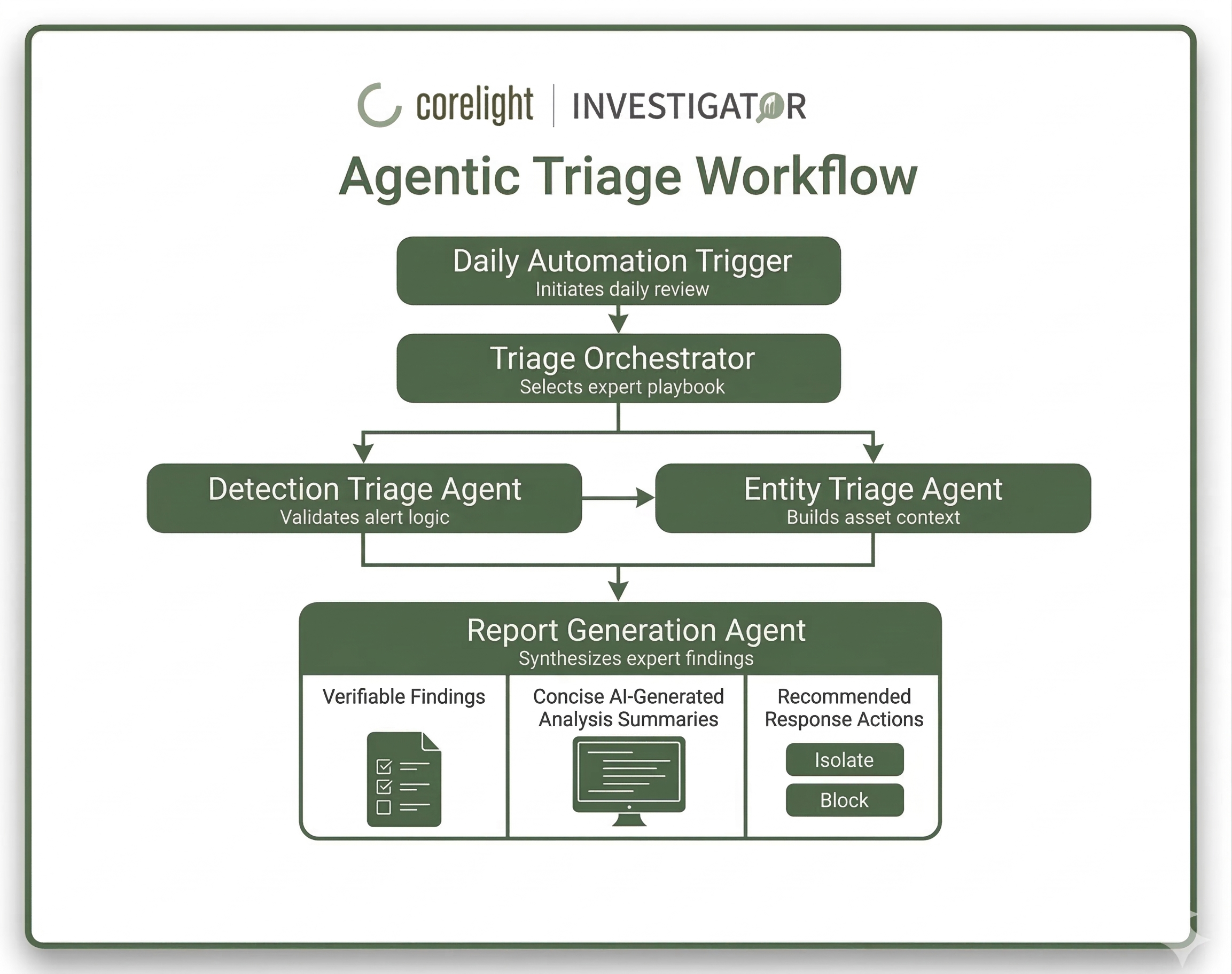
Daily automation trigger: This is the initiation point for the pipeline. The system scans your environment every 24 hours to ensure that critical threats are identified and addressed daily.
Triage Orchestrator: The triage orchestrator manages the investigation by identifying the entity involved and selecting an expert playbook. These playbooks are designed by Corelight practitioners to ensure a rigorous, human-like investigative methodology.
Detection Triage Agent: The Detection Triage Agent performs the initial validation of security events. It evaluates the detection logic against raw network telemetry to confirm the alert is accurate and filters out benign patterns or network jitter.
Entity Triage Agent: The Entity Triage Agent gathers environmental context by profiling the host involved in the activity to establish a behavioral baseline. It determines if the activity is consistent with the host’s typical and expected behavior.
Report Generation Agent: The Report Generation Agent synthesizes all validated evidence into a concise, natural-language Analysis Summary. It provides the final threat assessment and prioritized Recommended Responses, ensuring every conclusion is grounded in verifiable network evidence.
Playbooks and Key Findings
Agentic Triage utilizes investigation playbooks to produce high-fidelity findings. This structured approach ensures consistent outcomes across the SOC.
Playbooks: These serve as a standardized methodology, defining the exact steps taken to investigate a device. Analysts can click View Playbook in the interface to audit the specific questions the system asked during the process.
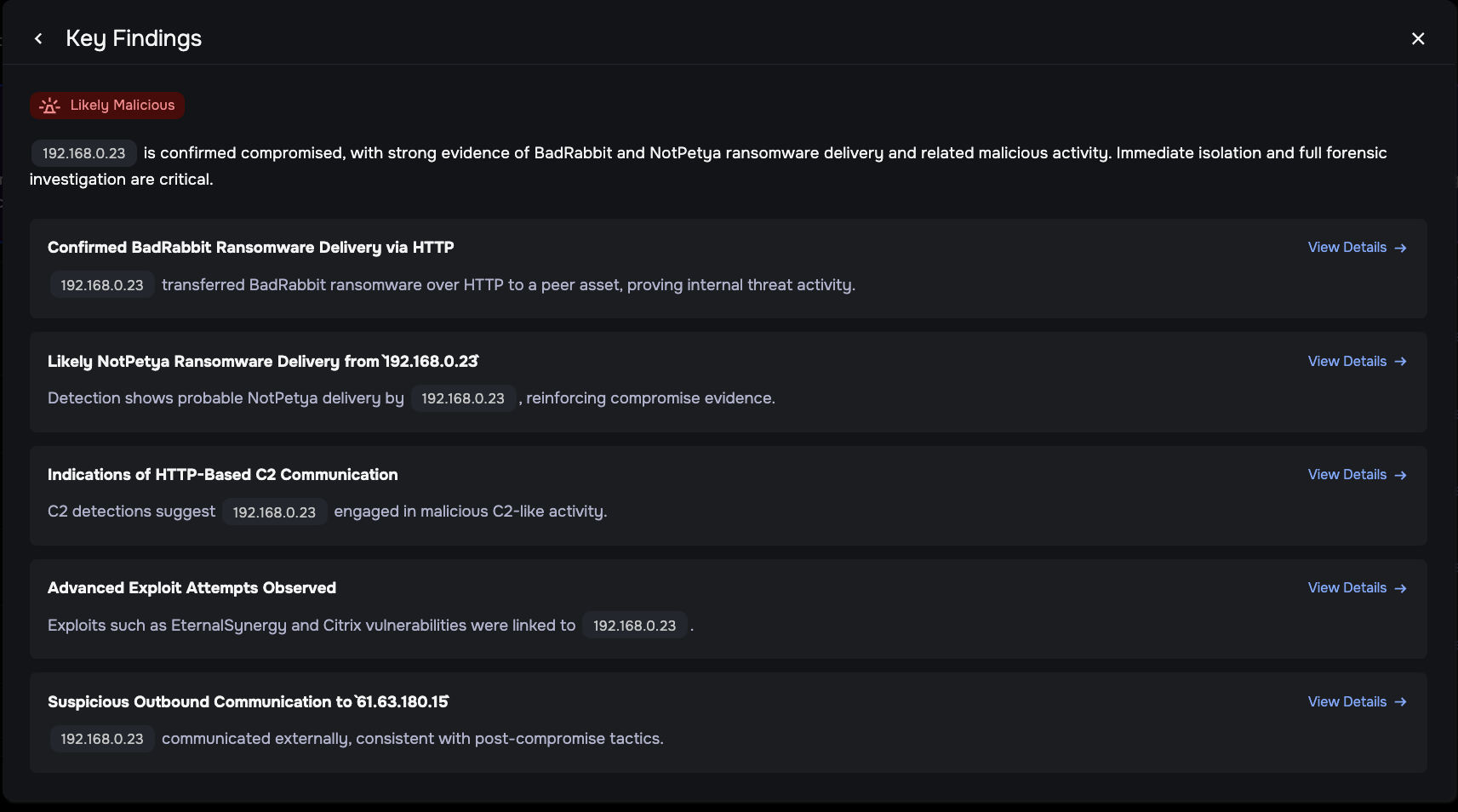
Key Findings: When a threat is validated, the system generates a Finding. Unlike a raw alert, a Finding is a verified fact, such as confirmed malicious activity, that has been cross-referenced against environmental context and actual network data. Analysts can click View Details on any Finding to inspect the Associated Evidence, which includes the exact JSON data the AI reasoned over to reach its conclusion.
Daily triage rules and limits
To maintain high signal accuracy and prevent information overload, the system operates within specific technical boundaries designed for a manageable daily workflow.
Prioritized daily volume: The system evaluates your environment every 24 hours to surface the top priority risks. This limit is calibrated to ensure the system prioritizes depth of analysis for the most significant threats rather than providing a shallow overview of every alert.
Important
There are limits on the maximum number of entities that can be investigated per day, which are based on your tenant’s bandwidth tier. For specific details regarding your daily entity investigation limits, contact Corelight Support.
Seven-day lookback: The engine evaluates network activity from the preceding seven days during every analysis cycle. This allows the system to focus on active threats while identifying slow-moving attack patterns. You can verify this timeline within the Evidence Findings panel or by pivoting into LogSearch, which will automatically filter for this seven-day window.
Analyst-led queue management: While the agents automate the heavy lifting of the investigation, you remain the final authority on the triage queue. The system is designed to keep critical findings in front of you until you’ve officially cleared them.
Clearing the queue: To remove an entity from the daily triage cycle, you must close all open detections associated with it. If detections remain open, that entity will continue to be prioritized in the next 24-hour analysis.
Influencing the next cycle: This “manual override” ensures that the system doesn’t stop tracking a threat just because a new day started. Once you’ve remediated a threat and closed the detection, the system frees up that slot for a new high-priority entity in the next scan.
Agentic Triage in the Investigator UI
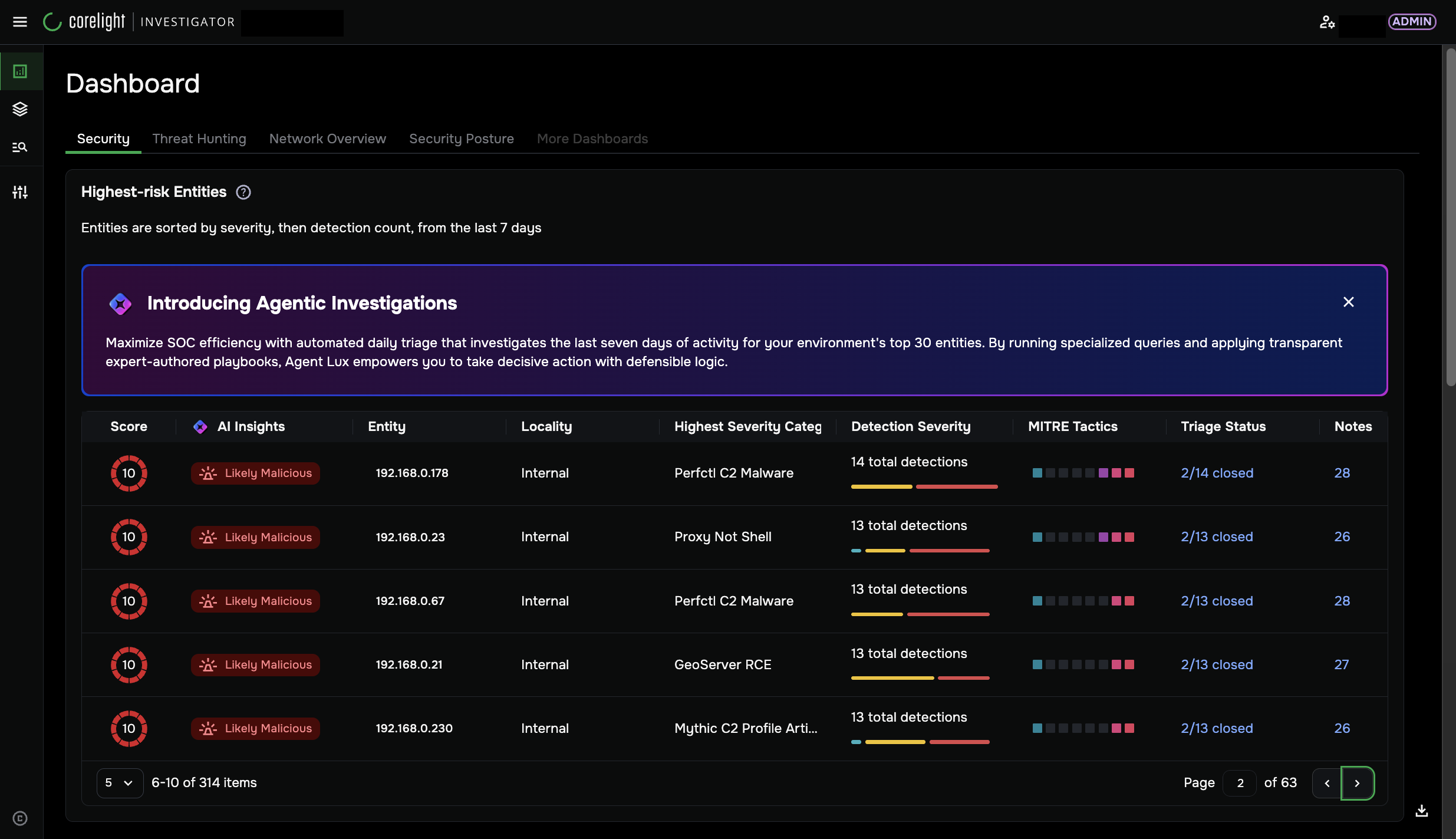
Agentic Triage primarily enhances the Security dashboard, Highest-risk Entities panel, Entity Overview, and EDR Details interfaces. Wherever Agentic Triage is active, look for the specialized AI icon to identify AI-generated insights and reasoning.
Note
Any section accompanied by the AI icon indicates that the content was autonomously generated by Agentic Triage. These insights are only visible if the GPT (Private data) integration is enabled by your administrator. If the integration is not enabled, these interfaces will display standard network telemetry and manual detections only.
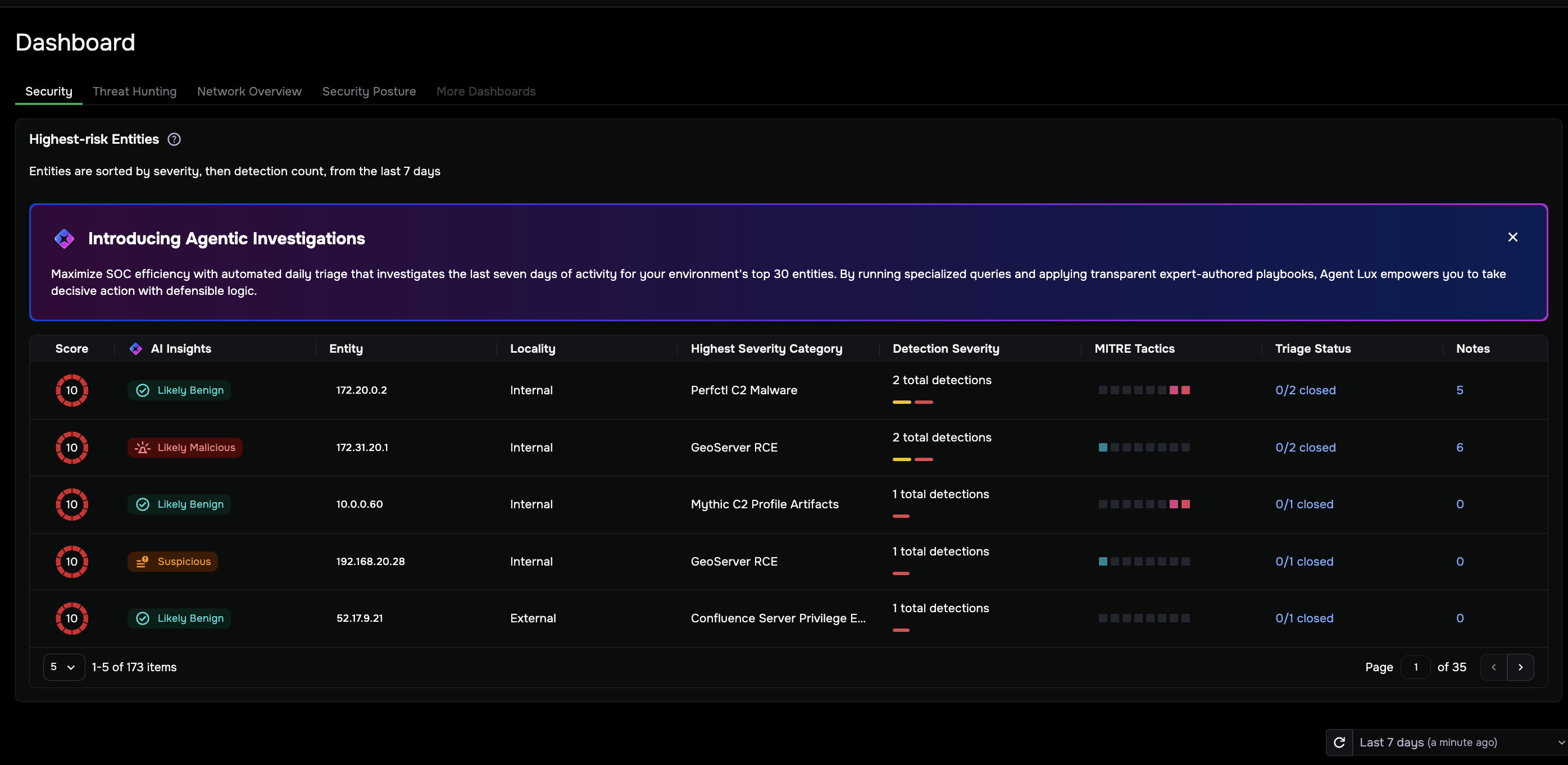
Highest-risk Entities panel
Located on the Security dashboard, this panel serves as your primary daily queue.
Top Priority Focus: Displays the highest-risk network entities identified during the most recent analysis cycle.
Dynamic Refresh: The list is updated every 24 hours based on an evaluation of the preceding seven days of network activity.
Immediate Verdicts: Each entity is ranked by a triage confidence score alongside AI Insights (for example, Needs Human Review or Suspicious) for rapid prioritization.
Entity Overview tab
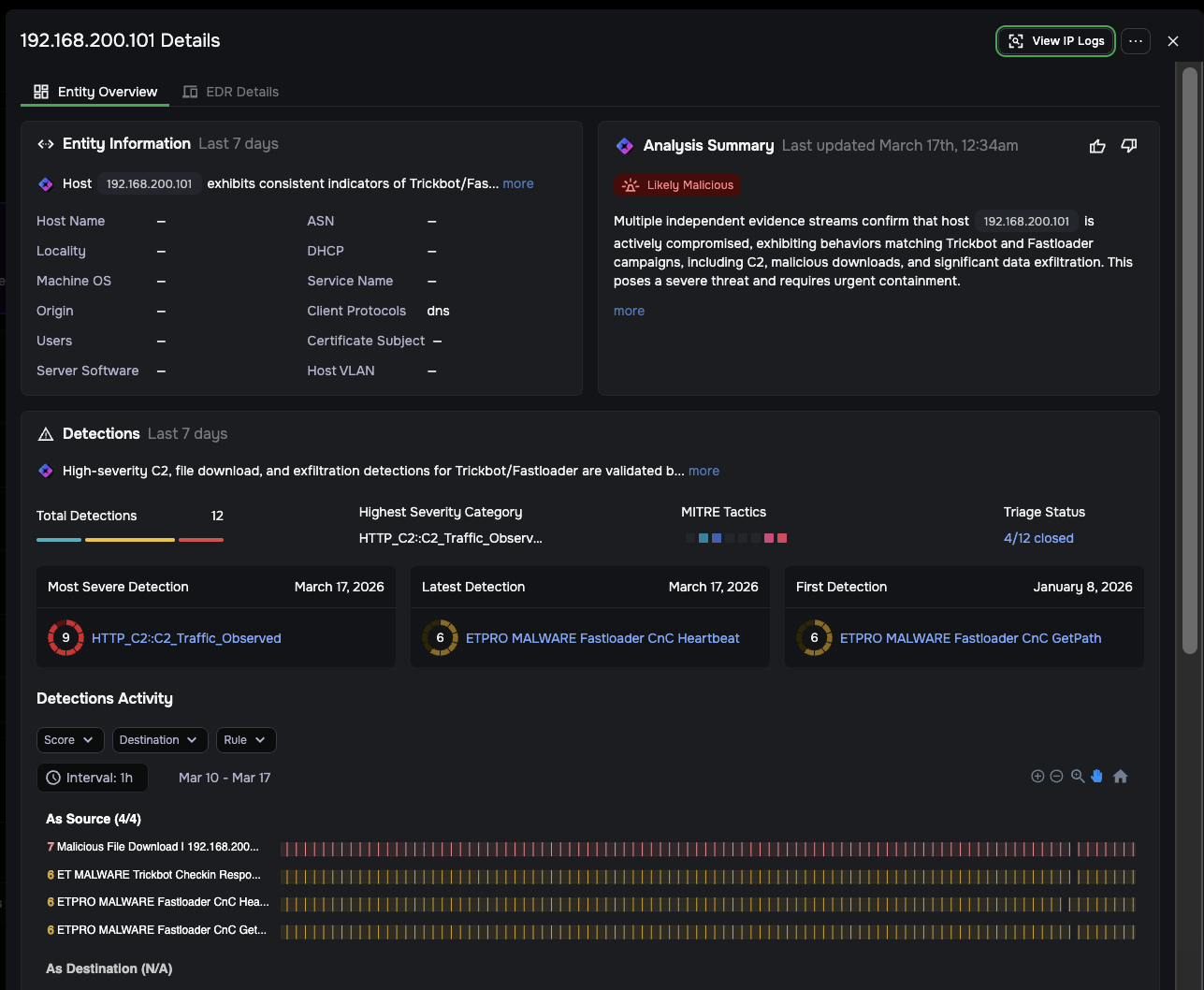
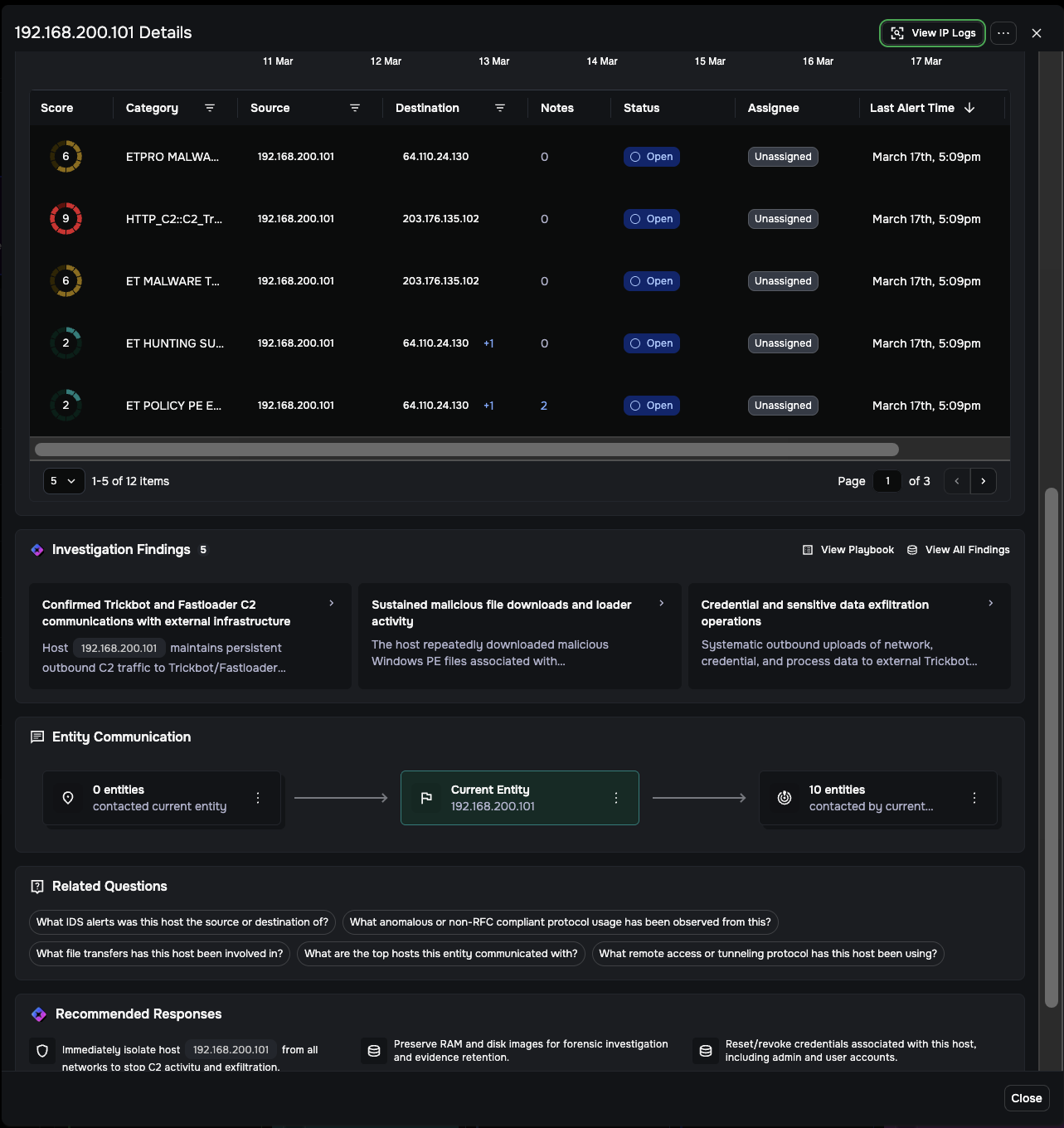
The Entity Overview serves as your primary investigation hub. This view consolidates a detailed AI analysis of the attack story with raw forensic telemetry, allowing you to move from alert to containment in a single tab.
Within this workspace, you can:
Review the Attack Narrative: Read the concise, AI-generated Analysis Summary to understand the scope and chain of the incident.
Inspect Validated Facts: Review the Investigation Findings for evidence-backed conclusions rather than sifting through raw alerts.
Audit the Logic: Click View Playbook to see the exact investigative steps and questions the system used to reach its verdict.
Key Findings and evidence
Agentic Triage is completely transparent, allowing you to audit the automated logic and the source data for every finding.
Inspect the reasoning: In the Key Findings modal, click View Details on any finding to see the Associated Evidence. This displays the exact JSON data the AI reasoned over to reach its conclusion.
Verify the source: Click View in LogSearch to see the actual query the agent executed to gather that specific telemetry.
Confirm the facts: By viewing the raw logs, you can independently confirm that all AI findings are based entirely on actual network traffic rather than generated assumptions.
EDR Details tab
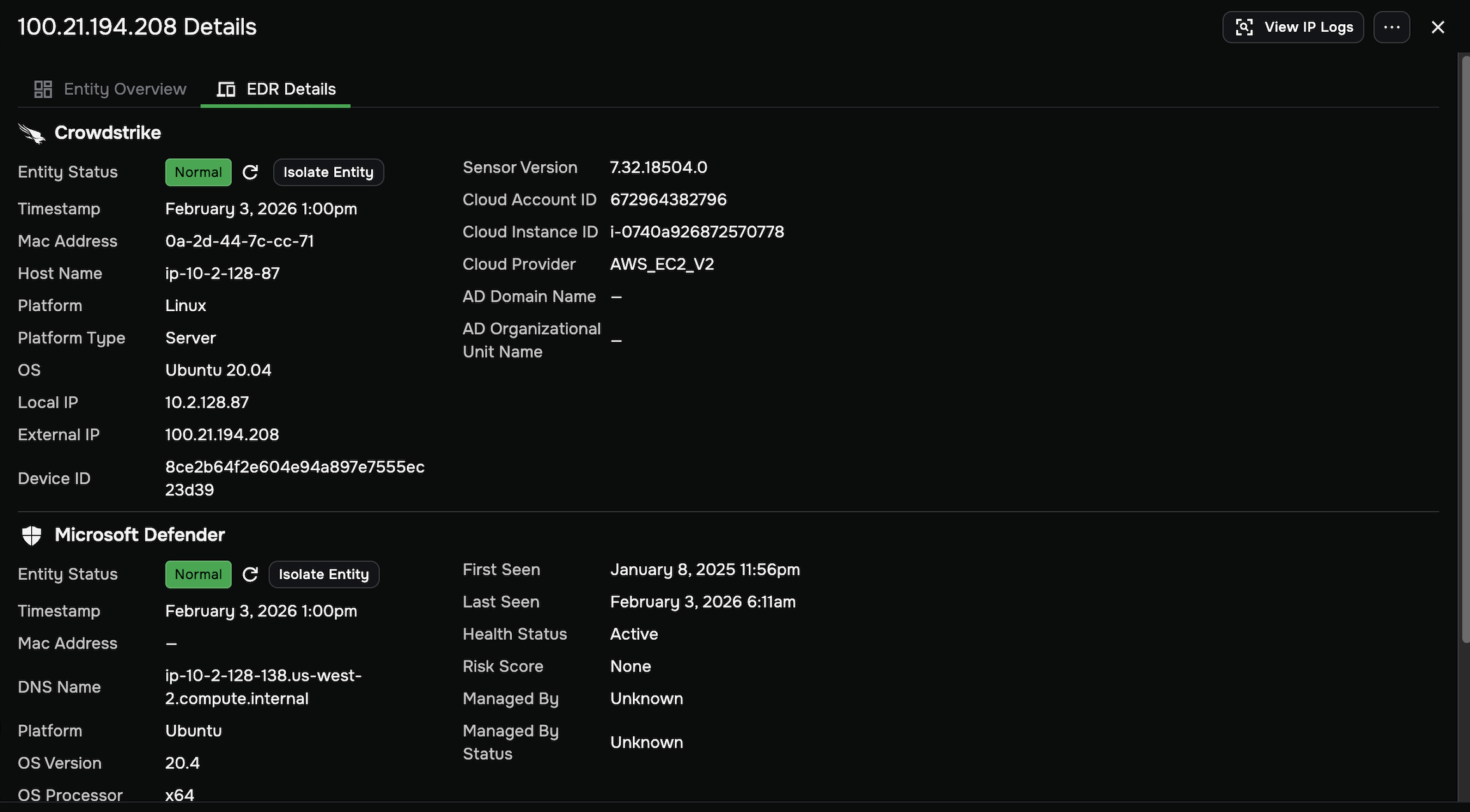
When your investigation is complete and you are ready to take action, switch to the EDR Details tab. Because Agentic Triage provides fully verifiable evidence, you can move immediately to containment with high confidence.
Within this tab, you can:
Review history: View the entity’s history to determine if remediation is already underway.
Execute containment: Initiate Isolation or Block actions directly through integrations with CrowdStrike, Microsoft Defender, or Palo Alto Networks.
Verify integration status: Check the real-time connectivity and status (for example, Normal, Isolated) of your integrated endpoint platforms.
Enable Agentic Triage
For the Agentic Triage feature to display on your Security dashboard, you must ensure that the GPT (Private data) integration is enabled. If this integration is not enabled, Agentic Triage will remain disabled and the Security dashboard will display the standard view.
Prerequisites
To enable the GPT (Private data) integration, you need to have Admin access. Analyst users can view the integration settings, but cannot make changes.
How to enable Agentic Triage
From System Settings in the left navigation, choose Integrations.
In the Integrations tab, click the GPT (Private data) card.
Click Configure.
Toggle the GPT integration value to Enabled and click Save.
Data privacy and trust
Corelight follows a strict Privacy First framework to protect your network telemetry. The system is designed to ensure that while the AI is powerful, your data remains secure and private.
Zero data retention: Agreements with our providers ensure that no submitted data or received responses are stored after processing.
No model training: Your private network data is never used to train, fine-tune, or improve underlying AI models.
Stateless processing: Data is used strictly for a one-time analysis and is immediately deleted once the report is finished to maintain a stateless environment.
Limitations and technical constraints
To ensure predictable performance and high-fidelity outcomes, Agentic Triage operates with the following technical boundaries:
Daily analysis schedule: Agentic Triage currently runs on a fixed daily schedule and is not real-time. The system is not user-configurable at this time. Consequently, there may be up to a 24-hour gap between the occurrence of a threat and its automated triage summary.
Entity prioritization limit: The system is designed to select and investigate a prioritized set of high-risk entities every 24 hours. This limit is optimized based on user research to ensure a manageable daily volume for human analysts.
Evidence filtering: Data displayed in the Associated Evidence window is filtered and aggregated specifically for the investigation at hand. While this ensures clarity, links to the original, unfiltered raw log data are provided whenever possible for deeper manual verification.
Chain of Thought visibility: While the UI currently displays finalized analysis summaries, significant “behind-the-scenes” reasoning occurs during the agentic process. Efforts are ongoing to expose more of this intermediate “Chain of Thought” (CoT) detail in future releases.